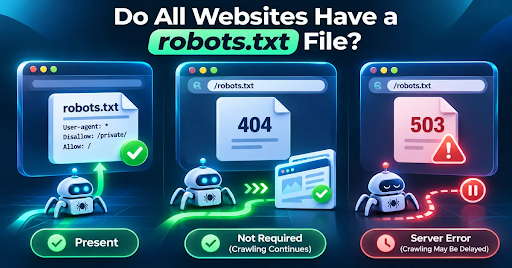
No, not all websites have a robots.txt file, and it is not mandatory for Google Search. If the file is missing and the server returns a normal 404 response, Google generally treats the site as having no robots.txt crawl restrictions. However, adding one can help manage crawler access to selected URLs.
Key Takeaways
- A robots.txt file is optional, not an SEO requirement for every website.
- A 404 response at
/robots.txtnormally tells Google that there are no robots.txt crawl restrictions. - A 5xx or 429 error is different: Google may temporarily reduce or pause crawling.
- A robots.txt file manages crawling, not guaranteed removal from search results.
- Test the exact website host and protocol before publishing crawler rules.
What Is a robots.txt File, and Why Do Websites Use It?
A robots.txt file is a publicly accessible text file placed at the root of a website. It gives cooperating web crawlers instructions about which URL paths they may request. For example, a site owner might discourage crawlers from visiting an internal search-results area while keeping product and article pages accessible.
Typical address: https://example.com/robots.txt. It is not a password system, a universal bot blocker, or a direct instruction to remove a page from Google. Search engines may still discover a blocked URL through links.
Is robots.txt Required for SEO?
No. Google does not require a robots.txt file for a website to be discovered, crawled, or indexed. A small public website with no areas to restrict can operate without one. The right question is not “Must I have robots.txt?” but “Do I have specific crawl paths to manage?”
What Happens if a Website Does Not Have robots.txt?
When Googlebot requests /robots.txt and gets an ordinary 404 (Not Found), Google treats the file as absent and assumes there are no crawl restrictions from robots.txt. That is not itself a search-ranking penalty, and it does not mean your site pages are returning 404.
404 vs 403 vs 503: Why the Response Code Matters
| robots.txt response | Google interpretation | What to do |
|---|---|---|
| 200 OK | Reads and interprets file rules | Check that no important paths are blocked |
| 404 Not Found | Assumes no robots.txt restrictions | Fine if this is intentional |
| 403 Forbidden | Generally treated as no restrictions | Do not use 403 to limit Google crawling |
| 429 / 5xx | Server or overload condition; crawling may pause | Investigate hosting, CDN, or security settings |
Google documents special handling for server errors, including the use of cached rules in some cases. Do not assume a 503 acts like a missing file.
Does Missing robots.txt Stop Google from Indexing Your Site?
No. Indexing depends on many other factors, including page accessibility, content quality, canonicalization, noindex directives, and discovery through links or sitemaps. A missing robots.txt does not automatically block Googlebot, but it also does not guarantee that a page will appear in search.
How to Check If a Website Has a robots.txt File
Step 1: Open the File Location
Enter your exact website origin followed by /robots.txt, such as https://example.com/robots.txt. Check the www and non-www versions where relevant. A file on a subdomain does not automatically control another subdomain.
Step 2: Read the HTTP Response and File Contents
If text rules appear, review the User-agent, Allow, and Disallow lines. If the address returns 404, the file may simply be absent. If you get an error, inspect the status code and any firewall or CDN behavior before assuming a robots.txt problem.
Step 3: Test Important URLs With a Robots.txt Tester
Open the free Online Website Tools Robots.txt Tester, enter your site, and fetch the existing rules. Test a blog post, product page, or other important URL against Googlebot. You can edit candidate rules and retest without changing your live website.
Test Robots.txt Free: https://onlinewebsitetools.com/robots-txt-tester/
When Should You Create a robots.txt File?
Create one when there is a clear reason to control crawler access. For instance, a store may want to discourage crawling of unhelpful faceted-navigation paths, or a site may need to prevent repeated crawling of public utility URLs with little search value. Be careful: blocking resources required for rendering can harm how Google understands a page.
When You Probably Do Not Need One
A simple brochure website, personal portfolio, or small blog with only public pages may not need any crawler restrictions. Publishing an unnecessarily complex file introduces another possible configuration error. You can add one later if your website changes.
Simple robots.txt Example for a Public Website
The example below keeps all paths open and includes a sitemap reference. Replace example.com with your actual domain:
User-agent: *
Disallow:

Sitemap: https://example.com/sitemap.xml
An empty Disallow line means no paths are blocked by this group. The sitemap entry is optional and does not replace submitting or maintaining a useful XML sitemap.
robots.txt vs noindex vs Password Protection
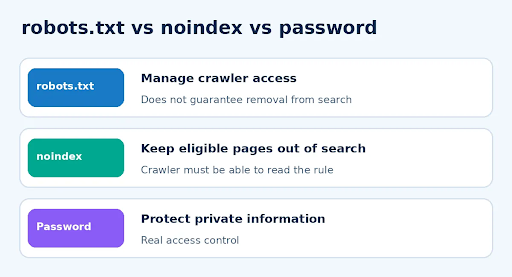
Different tools solve different problems: crawl management, search visibility, and actual privacy.
Use robots.txt to manage requests from compliant crawlers. Use a noindex meta tag or X-Robots-Tag when you want eligible content excluded from search results, while allowing Google to fetch the instruction. Use authentication for sensitive content, because robots.txt paths are public and not a security boundary.
5 Common Mistakes to Avoid
- Publishing
User-agent: *followed byDisallow: /on a production site. - Blocking a page in robots.txt and expecting Google to read a noindex tag on that same page.
- Assuming a 404 for
/robots.txtmeans the full website is broken. - Testing only the homepage rather than the important URLs and crawl agents.
- Treating a server or firewall error as harmless missing rules.
- Copying another website’s robots.txt without checking which paths exist.
Before updating your file, use the Robots.txt Tester to confirm the expected allowed and blocked paths. The tool can check multiple crawler identities and lets you compare edited rules before deployment.
Check Crawler Access: https://onlinewebsitetools.com/robots-txt-tester/
Frequently Asked Questions
Can a website rank on Google without robots.txt?
Yes. A robots.txt file is not a prerequisite for ranking. Google can crawl a publicly accessible website without one, assuming other technical and content requirements are met.
Is robots.txt mandatory for WordPress?
No. WordPress sites do not universally require a physical robots.txt file. Depending on configuration, WordPress may serve a virtual one. Check the live /robots.txt URL before making changes.
Is a missing robots.txt file bad for SEO?
Not automatically. For a website that wants all public URLs crawlable, a missing robots.txt can be perfectly acceptable. Problems arise when you needed crawl restrictions or have unexpected server errors.
Does every website automatically generate robots.txt?
No. Some content management systems, plugins, and hosting setups generate or serve a file, while others do not. Check the live URL instead of assuming it exists.
Can Google crawl a site with no robots.txt file?
Yes. A normal 404 response for /robots.txt means Google generally assumes no robots.txt restrictions. Other problems, such as authentication, noindex, or server failures, may still affect discovery and indexing.
Can robots.txt stop AI crawlers?
It can communicate restrictions to crawlers that honor the protocol. However, compliance varies by crawler, so robots.txt is not guaranteed enforcement or private-content protection.
Should I add a sitemap to robots.txt?
You may include a Sitemap directive to help crawlers discover your sitemap URL. It is useful but optional; omitting it does not automatically prevent indexing.
Does robots.txt block a page from appearing in search results?
Not reliably. Search engines can learn about a blocked URL from external or internal links. For search exclusion, use an appropriate noindex directive on content that can be crawled.
Is robots.txt the same for subdomains?
No. Rules are scoped by host, protocol, and port. A robots.txt on www.example.com does not automatically govern blog.example.com.
What should I do if robots.txt returns 503?
Check hosting availability, CDN rules, and security controls. Unlike a normal 404, a server error can cause Google to pause or reduce crawling while it retries.
Final Thoughts
Not every website needs a robots.txt file. If your site has no crawler-specific restrictions, it is usually fine to leave the file absent. If you do use one, the most important goal is accuracy: allow your valuable content, restrict only appropriate paths, and retest after changes.
Want to check the effect of your rules before publishing? Use the free Robots.txt Tester on Online Website Tools.
Test Your Rules: Open the Robots.txt Tester
Related Online Website Tools
Editorial Sources and Verification
- Google Search Central: Robots.txt Introductionhttps://developers.google.com/search/docs/crawling-indexing/robots/intro
- Google Crawling Infrastructure: Robots.txt Specificationhttps://developers.google.com/crawling/docs/robots-txt/robots-txt-spec
- Google Crawling Infrastructure: Useful Robots.txt Ruleshttps://developers.google.com/crawling/docs/robots-txt/useful-robots-txt-rules
- Online Website Tools: Robots.txt Testerhttps://onlinewebsitetools.com/robots-txt-tester/