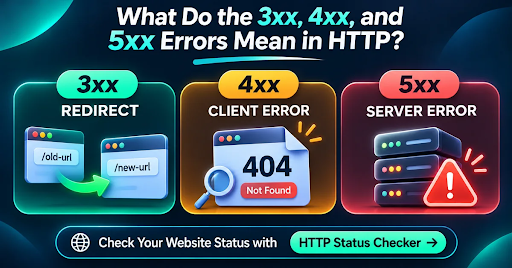
3xx means the browser needs to take another step, usually by going to a different URL. 4xx means the server can’t fulfill the request, often because a page is missing or access is restricted. 5xx means the server ran into a problem. These codes tell you where to look first, not always exactly what went wrong.
Key Takeaways
- 3xx: The page may have moved, or the browser can use a saved copy. It isn’t automatically an error.
- 4xx: The server can’t fulfill this request. A 404 is normal for a page that’s genuinely gone.
- 5xx: Something went wrong on the server, or on another server it depends on.
- A few errors aren’t a crisis. Broken pages that should work and repeated server failures need attention.
- Don’t judge a redirect by its first code. Check where it ends.
You’ve probably landed on a 404 page before. But not every HTTP status code is that obvious. An old URL might quietly send you to a new page. A website might block a request because it needs a login. Or its server might fail for a few minutes.
Here’s how to tell those situations apart and decide what to do next.
What Is an HTTP Status Code?
Every time you open a webpage, your browser sends a request. The server replies with a 3-digit HTTP status code. The first digit tells you the broad result.
For this guide, the important groups are 3xx (another step), 4xx (request problem), and 5xx (server problem). The next two digits explain the specific case.
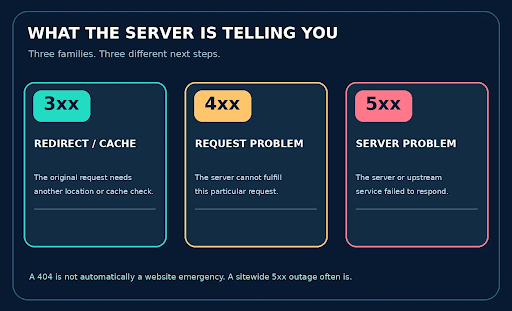
Think of these as three different questions: Did the page move? Can’t the request be completed? Or is the server having trouble?
What Do 3xx HTTP Status Codes Mean?
A 3xx code usually isn’t bad news. It means there’s another step before the request is complete. The most familiar example is a redirect: someone opens an old URL and the site sends them to a new one. A 304 is different. It lets the browser reuse a cached copy instead of downloading the same file again.
301 Moved Permanently and 308 Permanent Redirect
301 and 308 mean the move is permanent. Say you changed /old-guide to /new-guide. A permanent redirect sends people to the new address and tells search engines the move is intended to last. For most site owners, the main thing to check is simple: Does the old link reach the correct working page?
302 Found and 307 Temporary Redirect
302 and 307 are for temporary moves, they make sense when the original URL is expected to come back, such as during a short promotion. There are technical differences in how request methods are handled, especially with 307, but for a basic SEO check, start by asking: Is this move really temporary?
303 See Other and 304 Not Modified
303 tells the client to look at another URL, commonly after submitting a form. 304 means the saved version of a resource is still current. Neither automatically means the website is broken.
When a 3xx Response Becomes an SEO Problem
Redirects become a problem when people end up on the wrong page, go in circles, or hit an error at the end. A 301 that leads to a 404 isn’t a successful move. Follow the whole chain instead of looking only at the first response.
What Do 4xx HTTP Error Codes Mean?
A 4xx code means the server can’t complete the request as it was sent. The phrase ‘client error’ sounds like it’s always the visitor’s mistake, but that’s not true. A page may have been deleted, a URL may be wrong, or access may require permission.
400 Bad Request, 401 Unauthorized and 403 Forbidden
400 means the request isn’t valid as sent. 401 usually means login or other authentication is required. 403 means the server understands the request but won’t allow access. These can be normal on private areas, but they’re worth checking if public pages suddenly return them.
404 Not Found vs 410 Gone
404 means the server can’t find that URL. 410 says the resource has been deliberately removed. You don’t need to redirect every deleted page. If there’s no useful replacement, a genuine 404 or 410 is fine. But if a live product or article unexpectedly returns 404, fix the page or its links.
429 Too Many Requests
429 means the site is receiving too many requests from a client in a certain period. It often comes from a rate limit. It doesn’t mean the page has disappeared. Check the limits and, if supplied, the Retry-After header.
What Do 5xx HTTP Server Errors Mean?
A 5xx code means the server couldn’t finish the request. This might happen because the app crashed, a database stopped responding, the host is overloaded, or an upstream service failed. An isolated error may pass quickly. Repeated errors on important pages shouldn’t be ignored.
500 Internal Server Error
500 is the general ‘something went wrong on the server’ response. The code doesn’t tell you exactly why. Check server logs, recent updates, plugins, database connections, and resource usage.
502 Bad Gateway vs 504 Gateway Timeout
502 and 504 often appear when a website sits behind a proxy or gateway. With 502, the gateway got a bad response from another server. With 504, it didn’t get a response in time. Both usually call for checking upstream services and server logs.
503 Service Unavailable
503 means the service isn’t available right now, often because of maintenance or heavy traffic. It’s intended for temporary problems. If you’re taking a site down briefly, a real 503 response is better than showing an error page with a misleading 200. You can also provide a Retry-After header.
3xx vs 4xx vs 5xx: Quick Comparison
| Class | Typical meaning | Examples | First check |
|---|---|---|---|
| 3xx | Another step is needed | 301, 302, 304 | Follow the redirect or check cache |
| 4xx | This request can’t be fulfilled | 403, 404, 429 | Check URL, access, and limits |
| 5xx | The server can’t finish the request | 500, 502, 503 | Check server health and logs |
How These Codes Affect SEO and Google Crawling
Redirects change which URL Google processes
Search engines can follow a redirect to its destination. A permanent redirect is a stronger sign that the new URL should replace the old one. Keep redirect paths short, and make sure they finish on the right working page.
A true 404 is not automatically bad
A 404 isn’t automatically a ranking disaster. It’s the right response for a page that’s genuinely gone. The problem is when a page you still need, such as a product, article, or service page, returns 404 by mistake. Fix those pages and update links pointing to them.
Repeated 5xx failures can slow crawling
If Google keeps seeing 5xx responses or rate limits, it may slow its crawling. Prolonged problems can also affect indexing. Fix widespread server errors promptly, then check your important URLs again.
How to Check 3xx, 4xx and 5xx Codes on Your Website
The quickest way to see what’s happening across several URLs is to use Online Website Tools’ free HTTP Status Checker. Paste your URLs, run a check, and compare the original status with the final result. It supports up to 100 URLs at once, so you don’t have to inspect them one by one.
Test URLs in four steps
- Open the HTTP Status Checker and paste one URL per line.
- Choose if you want to follow redirects and select the request identity if relevant.
- Run the check and look at the initial status alongside the final status.
- Open any problem row to review redirect hops and headers; export the CSV if you need a working fix list.
Try it: Check HTTP status codes for free
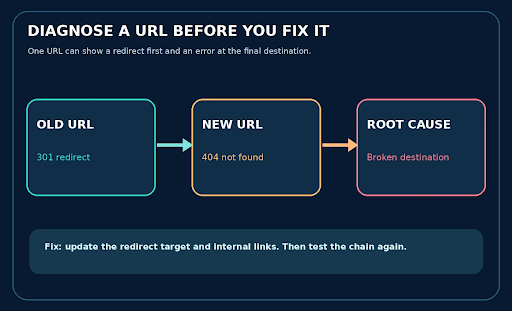
Remember: a redirect isn’t healthy just because it starts with 301. Check the last URL too.
Example: a redirect that hides a broken destination
Imagine /summer-sale returns 301 and sends you to /offers. But /offers returns 404. The redirect works; the destination doesn’t. Update the target and fix any internal links that still point to the old page.
What if the checker returns 403 but your browser works?
Some security systems block automated tools but allow normal browsers. If a checker shows 403 and the page works for you, compare results, try the available request settings, and review firewall logs. Don’t disable security just to make the test pass.
Try it: Review the redirect path
Which HTTP Errors Should You Fix First?
Fix errors based on what they affect. A 5xx on your homepage or checkout needs attention straight away. Next, look at unexpected 404s on valuable pages and redirects that lead nowhere. A deliberate 404 on an old deleted page can usually wait. You don’t need to treat every code as an emergency.
6 Mistakes When Diagnosing HTTP Status Codes
- Treating every 3xx response as a failure, even when a permanent redirect is correctly implemented.
- Assuming every 4xx response means the visitor made a mistake.
- Redirecting removed, unrelated pages to the homepage just to avoid a 404.
- Checking only the original URL while ignoring the final redirect destination.
- Confusing response time with complete page loading speed.
- Treating a tool’s 403 as proof that all visitors and search crawlers are blocked.
Frequently Asked Questions
Is a 3xx HTTP status code an error?
No. A 3xx response usually means the browser needs to follow a redirect or use cached content. A normal 301 isn’t a failure. Look for redirect loops, irrelevant targets, or final destinations that return errors.
What is the main difference between 4xx and 5xx?
4xx means the current request can’t be fulfilled, perhaps because the page is missing or access is denied. 5xx means the server or a service behind it couldn’t process the request. Neither class tells you the full cause on its own.
Does a 404 error hurt SEO?
A genuine 404 on a removed page is normal. It becomes an SEO issue when an important page returns 404 by mistake or internal links point to it. Fix those broken paths instead of sending everything to the homepage.
What is the difference between 301 and 302?
301 says a move is permanent, while 302 says it’s temporary. Choose the code that matches your intention. Then check that the redirect reaches the right working page.
What is the difference between 502 and 504?
502 means a gateway received a bad response from another server. 504 means it waited too long for a response. Both usually need a look at the upstream service and server logs.
Why might a website return 503?
503 usually means a service is temporarily unavailable because of maintenance or overload. Check server health and capacity. If the downtime is planned, a Retry-After header can tell clients when to try again.
What does HTTP 429 mean?
429 means too many requests have arrived within a set period. It’s a rate-limit response, not a missing-page error. If legitimate visitors or search crawlers keep receiving it, review your limits.
Can a URL return both 301 and 404?
Yes. An old URL can return 301 and send visitors to a new URL that returns 404. That’s why you should check both the starting code and the final destination.
Does HTTP 200 guarantee indexing?
No. A 200 means the server handled the request successfully. It doesn’t guarantee Google will index the page. Google also considers indexing instructions and content, and it may treat a ‘not found’ page with a 200 response as a soft 404.
How can I check many HTTP status codes at once?
Paste your URLs into the HTTP Status Checker and run a batch test. It supports up to 100 URLs and shows redirect details. You can export the results to CSV to work through the problem pages.
Final Thoughts
The easiest way to remember the difference is this: 3xx means ‘go somewhere else or use your saved copy’; 4xx means ‘this request can’t be fulfilled’; and 5xx means ‘the server couldn’t do its job.’ Don’t stop at the label. Check the exact code, the URL involved, and, for redirects, where the request ends.
Try it: Test your URLs now